


WooCommerce is the popular plugin for WordPress that lets you enable all those selling features that are not natively present in the CMS.
Thanks to WooCommerce, we have a series of additional sections in the site’s backend from which we can manage our products, create categories, enable payment methods and manage orders.
Let’s take a look together at some features of this plugin.
Adding products
Adding products is a fairly simple process.
The first pieces of information to fill in are:
- The name of the product.
- The short description: a text that summarises the main features in a few lines.
- The long description: a more detailed text that better describes the features of our product.
- The image — the main one and any additional images.
Once you have entered the basic information, you can proceed to add the advanced information directly in the box below the description.
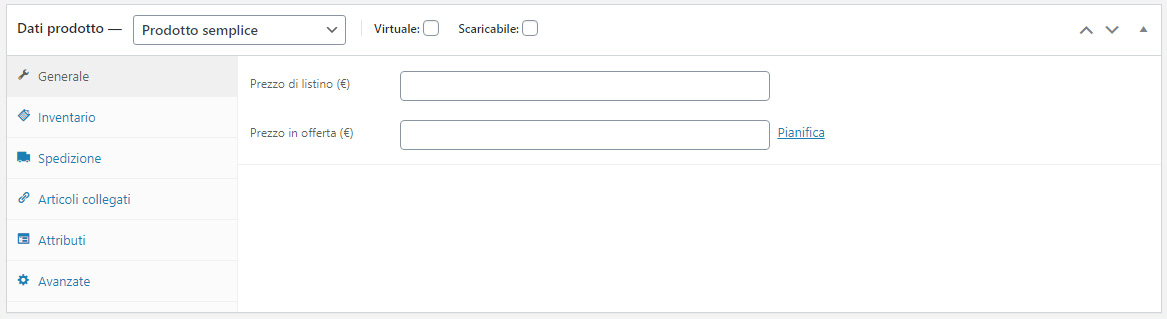
In the “Product data” section there is a drop-down menu where we can choose the type of product we want to create: depending on this choice, different attributes and features are offered during the input stage.
- Simple product: a product with physical, well-defined characteristics, for example a book, a mouse, etc.
- Variable product: a product with variable characteristics based on the user’s choice. The variables can be based on one or more attributes (for example, a T-shirt can be sold in several sizes and several colours).
- Grouped product: is not really a product, but a grouping of several simple products. For example, a Christmas hamper that contains several products from our catalogue.
After choosing the type of product we want to create, we can start entering all the information that will make up our product page: sale price (and any discounted price), quantity, weight, attributes, related products and so on.
Once we have filled our catalogue, and after correctly classifying our products, we can focus on the second configuration phase of our site: managing payment methods.
Choosing payment methods
To enable our e-commerce to sell, we need to activate one or more payment methods, and WooCommerce already includes the most common ones, ready to be enabled (such as PayPal and Bank Transfer).
It is always advisable to offer the user more than one payment method to give greater flexibility during checkout.
Some buyers (especially older ones) do not have a PayPal account, and are therefore more likely to make a purchase if they can pay with cash on delivery.
Other users (especially digital natives), prefer to pay with payment apps such as Satispay or with the classic, timeless credit card.
However, you need to be very careful not to overdo it by activating too many payment methods, because the user might get confused and decide to abandon the purchase.
The choice of payment methods should not be left to chance, but should be made consciously and in relation to the audience of our online shop, to avoid cart abandonment and increase the probability of purchase as much as possible.
Setting shipping costs
The big online sales portals have got us used to ever-faster shipping at ever-more-affordable costs. In some cases, no more than 48 hours pass between the moment we make a purchase and delivery. It is therefore essential to carefully choose the supplier who will handle shipping and to devise the pricing strategy best suited to our e-commerce site.
In WooCommerce you can set flat-rate shipping costs that can become free under particular conditions (for example, for orders above a certain amount).
If we wanted to apply more complex cost rules (for example, tiered by weight bands) we would need to use an additional plugin. One of WooCommerce’s great advantages is precisely the wide availability of plugins (sometimes even free) that can help us add features that aren’t included by default.
Promotions and discounts
After adding the products and setting up the payment and shipping methods, our e-commerce site is ready for online selling.
To be competitive and build customer loyalty, it is very important to plan promotions and discounts. With WooCommerce you can apply discounted prices to our products by deciding the validity period of our discount, or create coupon codes that apply fixed-amount or percentage discounts on the order total. This way we can manage the sales period semi-automatically and create discount vouchers to offer to our best customers.
Conclusion
WooCommerce is the ideal solution for anyone who wants to “try out” the potential of online selling while having a product catalogue that isn’t too large.
For more structured e-commerce sites, however, you need to consider a CMS with more advanced features that allow you to manage sales in an extremely professional way.
Platforms such as Prestashop or Magento, for example, have been designed and developed to handle data in a more advanced way than WooCommerce, and provide a much more complete set of selling tools and order reporting.
The choice of CMS must be made very carefully, analysing the pros and cons of each CMS, as described in the article “Opening an online shop: a new challenge in the world of digital marketing”.